Get it signed.Without the printer.

Send your contract, or describe one and let AI draft it. Your client signs on their phone. You both get the signed copy. No printing, no app to install.

Free for 7 contracts a month · no card needed

A ready-made template for the paperwork you already send

  • Retainer agreements
  • NDAs
  • Freelance contracts
  • Engagement letters
  • Offer letters
  • Rental agreements
  • Vendor agreements
  • Consent forms
  • Statements of work
  • Partnership deeds
See all 30 templates

1Draft

No contract yet?
Describe it.

One sentence gets you the right template, filled in with names, amounts and dates. Already have a PDF? Upload it and fix it on the page.

Your letterhead on every contract.

Upload the letterhead your firm already uses, as a PDF or an image. Every document you make from a template prints on it, with the text kept clear of your header and footer. No letterhead? Make one from your logo and details in one click. Keep several, and pick one for each template.

30

templates, each with a version for India, the US, the UK, Germany, Brazil, Spain and Switzerland.

Fill it from a chat. Check it before you send.

Paste a WhatsApp chat or an email, and the details go to the right places. One more click lists missing or unclear terms, each with a fix.

Fix the PDF before you send it.

Change a word, cover an old clause, add your logo, number the pages, or reorder and join pages. No other app needed.

Browse the templatesTemplates and AI drafts are a starting point, not legal advice.

2Send

Show where to sign.
Pick who signs.

  • Drag a signature, date or text box onto the page.
  • Pick who signs from your contacts, or type an email.
  • Up to 50 people on one contract.

Signing order.

Decide who signs first. The next person gets the email only when it is their turn.

Your contacts, ready.

Everyone you send to is saved. Import a list from a spreadsheet and sort people into groups.

Bulk send.

Send one contract to as many people as you need. Each person signs their own copy.

Send the same PDF again.

Save a prepared contract as a template. The boxes and the signing order stay. Next time, type the new names and send.

3Sign

They sign on their phone.
No account. No app.

  • The signer opens the email and types a short code.
  • They sign with a finger, or by typing their name.
  • Reminders go out on their own until they sign.

This is what your client does. Try it.

I agree that DulySigned is the simplest way to get a contract signed.

Date—

Ask for ID and papers.

Ask each signer for a passport, PAN card, proof of address or any other document. They upload it before they sign. You open each file and approve it, or send it back with a reason. The contract completes only when you approve.

0

accounts your clients need to make.

Accents print right.

Accented names, plus Greek, Cyrillic and Hindi text, print correctly in the signed PDF and the certificate.

Know where things stand.

Every contract shows who has signed, who is next, and whether each email arrived. So you never have to ask “did you get my email?”

Resend in one click.

Email lost in spam? Send a fresh link. Their progress stays. Signers can ask for a new code right on the page.

Your brand, not ours.

Your logo and colours on the signing page and in every email.

Built for a team.

Invite people to your firm. Everyone sees the shared contracts and contacts.

4Prove

Proof on every contract

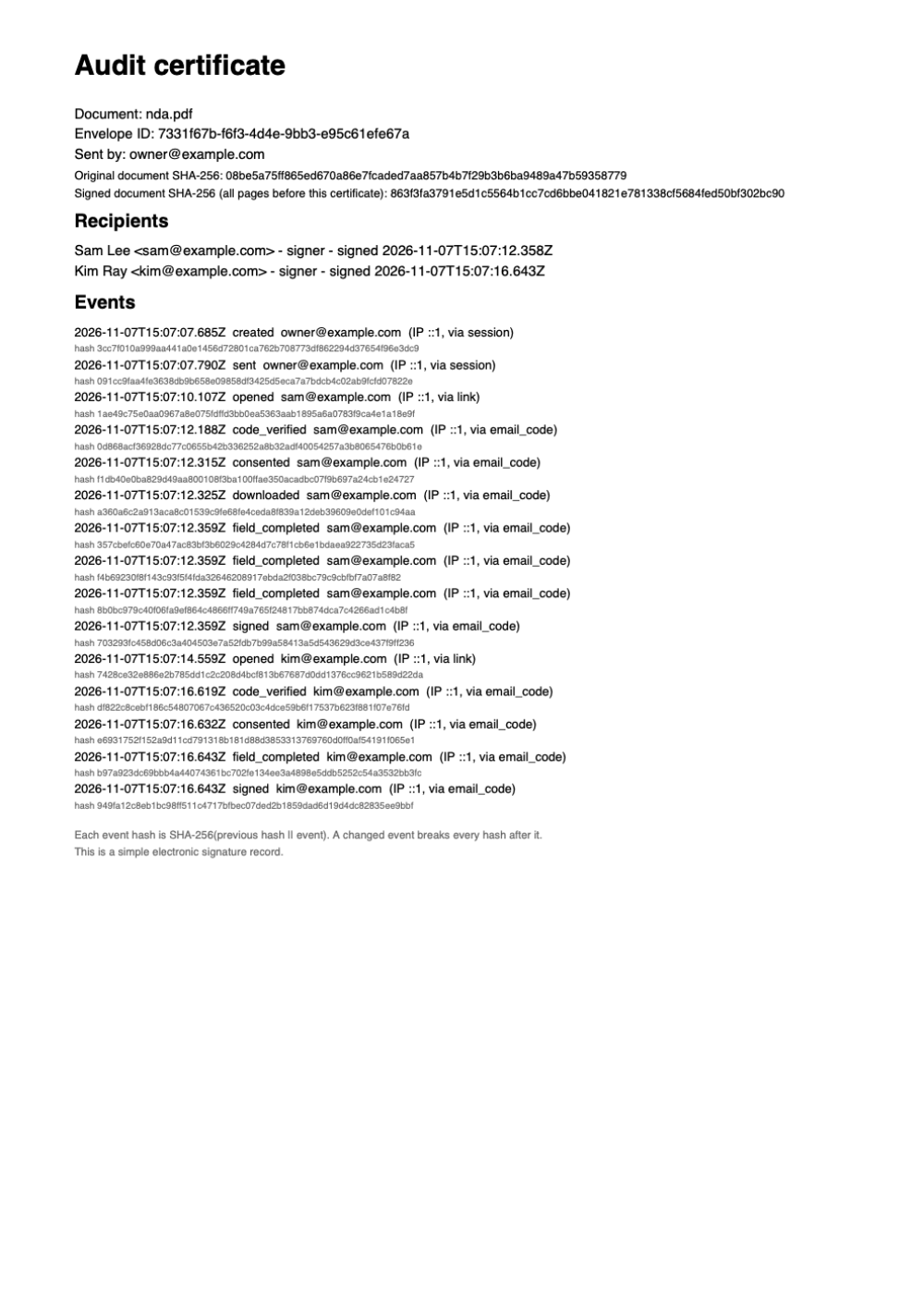
Every signed contract comes sealed, with a certificate. It records who signed, when they signed, and where they signed from. Change a single line, and the seal shows it.

An audit certificate page listing the document, the signers, and every event with its time
  • A code by email.Each signer types a code sent to their inbox, so you know the right person opened it.
  • Consent on record.Before signing, your client agrees to sign electronically. We save when and from where.
  • The original, untouched.Your uploaded file never changes. Every edit and signature is logged.
  • A seal and a timestamp.DulySigned seals the final PDF and gets a trusted timestamp. PDF readers show the seal as broken if anyone edits the file.
  • Check any copy.Anyone can drop a signed PDF on dulysigned.app/verify and see if it is the real, unchanged file. The file stays on their device.
  • Emails people can trust.No attachments, the real sender’s name, and a page that explains how to check a link.

Start free.
Pay when you grow.

No per-contract fees. Cancel any time.

Free

$0

Try it on real contracts.

Start free
  • 7 contracts a month
  • 5 AI actions a month, including 1 new document
  • Up to 5 people per envelope
More features
  • All 30 templates, 3 saved
  • PDFs up to 10 MB and 30 pages
  • Signing links last up to 30 days
  • Signed copies kept 7 years

Starter

$9.99/month

For one owner or freelancer who sends each week.

Choose Starter
  • 25 contracts a month
  • 25 AI actions a month, including 4 new documents
  • Up to 10 people per envelope
  • Automatic reminders
More features
  • PDFs with web links, up to 25 MB and 100 pages
  • 10 saved templates
  • Signing links last up to 60 days
  • Signed copies kept 7 years

Business

$29/month

For small firms that send every day.

Choose Business
  • 75 contracts a month
  • 75 AI actions a month, including 10 new documents
  • 3 team members
  • Your logo, colours and letterhead
More features
  • Up to 25 people per envelope
  • Automatic reminders
  • No DulySigned credit on your documents
  • Unlimited saved templates
  • PDFs with web links, up to 50 MB and 300 pages
  • Signing links last up to 180 days
  • Signed copies kept 7 years
  • Priority email help

Scale

Custom

For firms that send more than 75 contracts a month.

Talk to us
  • Contract volume set in your quote
  • Unlimited team members
  • Bulk send to any number of people
  • Audit log export (CSV)
More features
  • AI actions set in your quote
  • Up to 50 people per envelope
  • Signing links last up to 365 days
  • PDFs up to 50 MB and 300 pages
  • Signed copies kept forever
  • Your logo, colours and letterhead
  • Yearly contract, billed by invoice, with a 30-day money-back guarantee
  • Help moving your templates
  • A named contact

Prices include tax. Your signed documents stay yours on every plan.

Questions

Do my clients need to download anything or make an account?

No. They get an email, open the link, type a short code from their inbox, and sign. It works on any phone, tablet, or computer.

Is an e-signature from DulySigned valid?

DulySigned creates simple electronic signatures. Many countries accept them for everyday business papers such as NDAs, engagement letters, and freelance contracts. Some documents still need a handwritten signature or a certified digital signature, for example wills, property sales, and, in India, documents that require Aadhaar eSign or a DSC. If you are not sure about a document, check with your lawyer.

What proof do I get after signing?

Every finished contract gets a certificate page at the end. It lists each signer, the time they signed, the address they signed from, and every step in between. DulySigned also seals the PDF and adds a trusted timestamp, so a PDF reader shows the seal as broken if anyone changes the file. Anyone can check a copy at dulysigned.app/verify. The seal protects the file; the signatures are still simple electronic signatures.

My client lost the signed copy. Can they get it again?

Yes. The Completed email has a download link that works for any file size. It asks for a code sent to their inbox, then they download the signed PDF and the certificate. You can also send the signed copy again from the envelope page.

Can I use Hindi names and text?

Yes. Hindi, Marathi and other Devanagari text, as well as Latin, Greek and Cyrillic, print correctly in templates, edited text, signatures and the audit certificate. Other scripts are not supported yet.

Can I ask signers for an ID card or other documents?

Yes. Ask each signer for up to 5 documents, such as a passport, a PAN card, proof of address or a company certificate. They upload photos or PDFs before they sign. You open each file and approve it, or reject it with a reason, and they get a link to upload again without signing again. The contract completes only when you approve every document. DulySigned checks only the file type and size, not whether a document is genuine. Only your team sees the files.

Can I change the PDF after I upload it?

Yes, until you send it. You can change text, cover a line, add your logo or page numbers, and add, remove, or reorder pages. The file you uploaded is kept exactly as it was.

Can DulySigned write the contract for me?

Yes. Describe what you need in one sentence, and DulySigned opens the right template with your details filled in, or writes a new document when no template fits. Then ask for changes in plain words, and check it for missing terms before you send. Templates and AI drafts are a starting point, not legal advice, so ask a lawyer to review contracts that carry real risk.

What does the AI see?

The AI sees the document text and what you type or paste into the assistant. Details that you type into the form stay with DulySigned. Signers never talk to the AI.

Is my data safe?

Your files are stored on Cloudflare and encrypted when they are sent and when they are stored. Only you and the people you send a contract to can open it.

What happens when I pass 7 contracts on the free plan?

You can send again on the 1st of next month, or upgrade. Starter is $9.99 a month for 25 contracts and 25 AI actions. Yearly billing gives 2 months free.
Your next contract.
Signed today.

Sign in with your email. No password, no card.

Sister product

ShareHue

Turn a brand guideline PDF into an editable brand site and asset library. Free for now.

See ShareHue brand sites